Designed the MP1584 Buck Converter for the Raspberry Pi!
- Session
- 16 of 33
- Date
- 11 May 2026
- Time worked
- 3 h 5 min
- Reading time
- 7 min
- Images
- 10
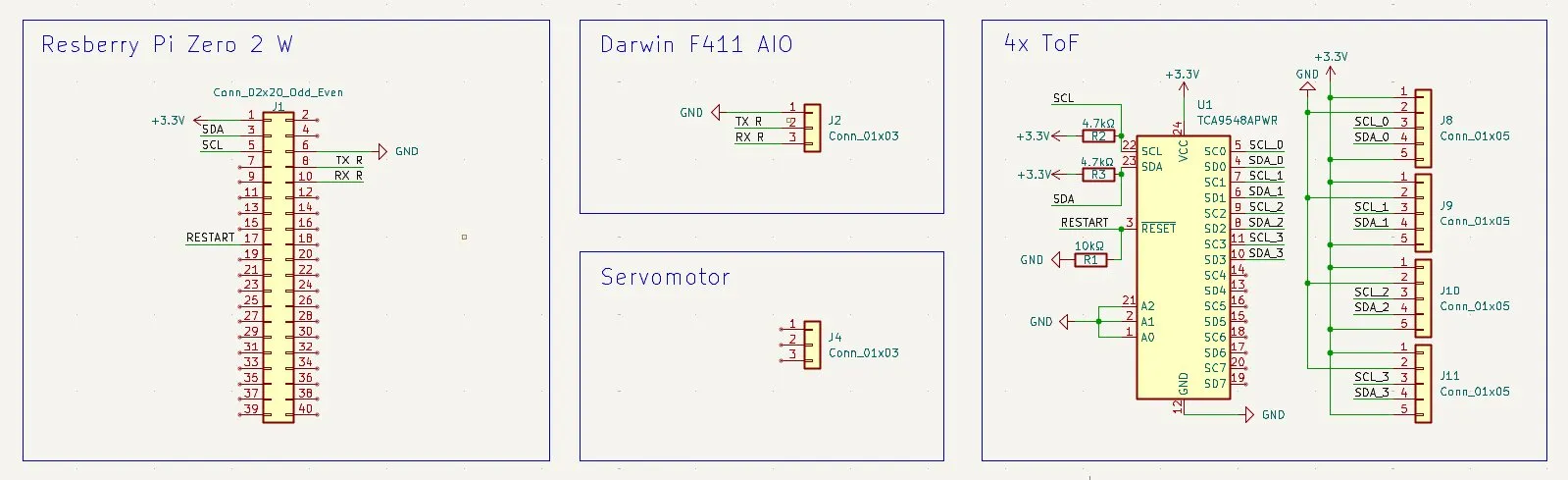
Now I started and remembered during that day that I forgot to add the pullups for SCL and SDA, and I did the pullup for the RESET wrong, because it must always be connected in parallel to 3.3V. For the reset I can use the 10kΩ, but for SDA and SCL I will use 4.7kΩ because of the required I2C speed requirements.
But then I thought that it didn't really make sense
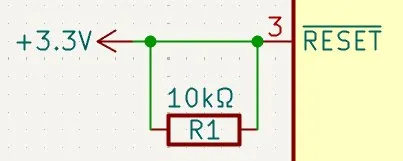
And then I also thought that I maybe should actually connect the reset pin to a GPIO pin on the Raspberry Pi so that if for some reason the I2C crashes, I can easily restart it.
So after reading the datasheet again, I agreed with myself that this would work, and so I decided to connect it to the GPIO pin 17. And after updating everything, it looked like this:
And after all of that, I had continued working on the power supply, which I was a bit afraid of because it was the MOST IMPORTANT THING for the drone PCB.
To start with, I searched up the battery to check which cables it has and the ampere/volt ect.
But after seeing the battery again, it confused me. There were 6 cables (I thought I would just need + and - T-T)
But after googling, I found out that the two thick cables were for + and -, and the other 4 smaller cables were for measuring the capacity of the 3 individual cells(I will need that for percentage and low battery tracking).
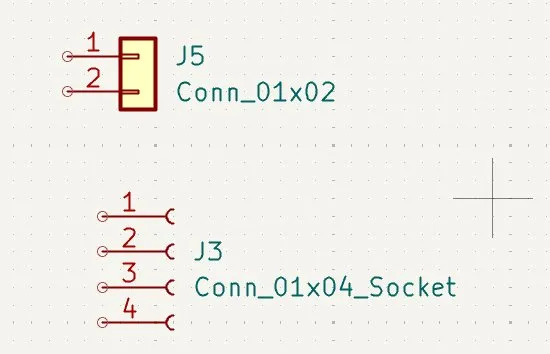
So lastly I found out that the 2 cable types were an XT30 port, and for the 4 cables it was a JST-XHR-4P connector. So after finding that out, I implemented them into KiCad.
Then I started by searching how much power the Raspberry Pi needs, and I found out:
5V power supply and typically works best with at least 2A or 2.5A
But then I was a bit shocked. 2-2.5A?!?! My battery only has 850mAh capacity??
So I searched up if that was ok and how I could fix that, and then I realized the voltage of the battery is toooo high for the Raspberry Pi. So I would need a buck converter! And then my problem would also be solved, because if you reduce the voltage, you gain more current/amps (flashbacks from my physics class ;) )
Sooo, I quickly searched for an SMD 5V buck converter and I found the MP1584EN. But after that, I realized that it wasn't only that single component, it requires many others. I wasn't sure if I should use a finished module or build one myself. So I searched up which other parts are needed, what's with the price, and how hard it would be to solder, and then I would decide.
- The Controller IC (MP1584EN): A Monolithic Power Systems (MPS) IC that handles switching at a high frequency (up to 1.5 MHz).
- External Coil Inductor: Crucial for energy storage in a switching regulator, working in conjunction with the IC.
- Trimming Potentiometer: A blue, small potentiometer used to adjust the output voltage, allowing user adjustment from 0.8V to nearly input voltage levels.
- Capacitors and Resistors: Input and output capacitors, along with feedback resistors, to manage stability and reduce output ripple.
How much do they cost together in SMD? About 2-3€, which is really fine. And after that, I decided to build the buck converter by myself because no risk, no fun, and I wanna learn sth new....
So then I started learning how this module works by finding some nice spots in the datasheet. But then I had the problem that the MP module wasn't in the KiCad library, so I had to manually import it. I got it from the KiCad GitHub repo and added it into KiCad. But I wasn't sure which net label I should use as a reference, as the only one I found was one that said 4.5V-28V input, and I wasn't sure if that would be fine.
But this should be fine, because after being on Reddit, I saw that if you calculate the voltage, you actually get 5.18V, which is perfect for the Raspberry Pi because it needs slightly more than 5V to run perfectly under load. And this was the 5V schematic for the circuit:
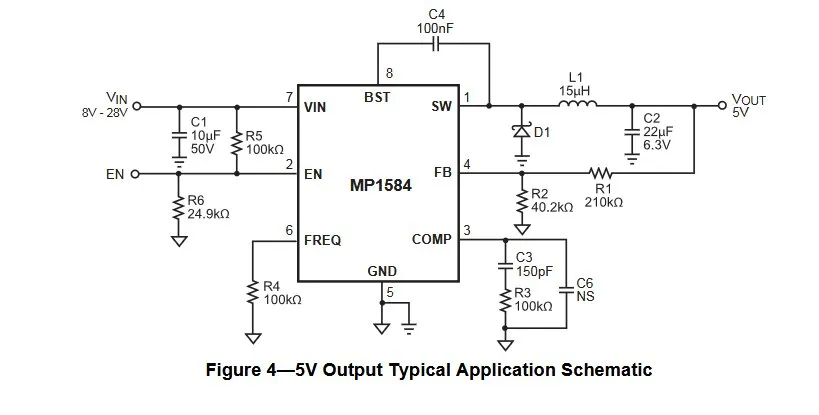
Then I found out waht the pins of the MP1584 are for: The chip itself has 8 pins:
- VIN: Input for the + of the battery.
- EN: Enable pin. If there is voltage on it, it runs, and if GND is connected, it stops.
- FREQ: Here you define how fast the chip switches with a resistor (R6).
- SW: The switch node where the power is toggled.
- BST: The bootstrap pin for the extra voltage boost.
But finally, after like 1h, I understood how the process of the chip and the convert worked. The MP1584 lets the voltage through to the inductor (coil), and there it switches the flow. The diode keeps the current flowing so that the energy is saved in the inductor, and this voltage is going to the Raspberry Pi with 5V. The MP chip decides how fast it has to "cut the flow" to get exactly 5V at the end.
Additionally, you can define that there is exactly 5V as output by just changing R1 and R2. The formula for calculating that is:
$V_{OUT} = 0.8 \cdot (1 + \frac{R1}{R2})$
The 0.8V is a reference value for the chip so that it knows whether it has to switch faster or slower. And lastly, there are capacitors for making the power smoother so that it's perfect.
That was the basics of the chip, and then I started drawing that in KiCad.
Buuut while doing that, the problem was that I couldn't find capacitors. But then I saw online that you have to type "C_small" to find one (why?!?!).
But then I had to place the GND tag, but then (AGAIN) I wasn't completely sure if I could use the same GND like I use for the internal Raspberry Pi. But after checking, you can and should combine the GND into one system, so I did it.
But then I was confused. There was the ground symbol that I knew, but also another symbol like a triangle. So after searching, I found out that at the positions with the 3 lines (GNDREF), tons of power is flowing, and at the "normal" triangle GND, only small signal currents flow. Both are connected, but I decided to separate them so that in the design process I don't forget to make thick and large copper plates for the power GND.
After drawing the first half I got this:
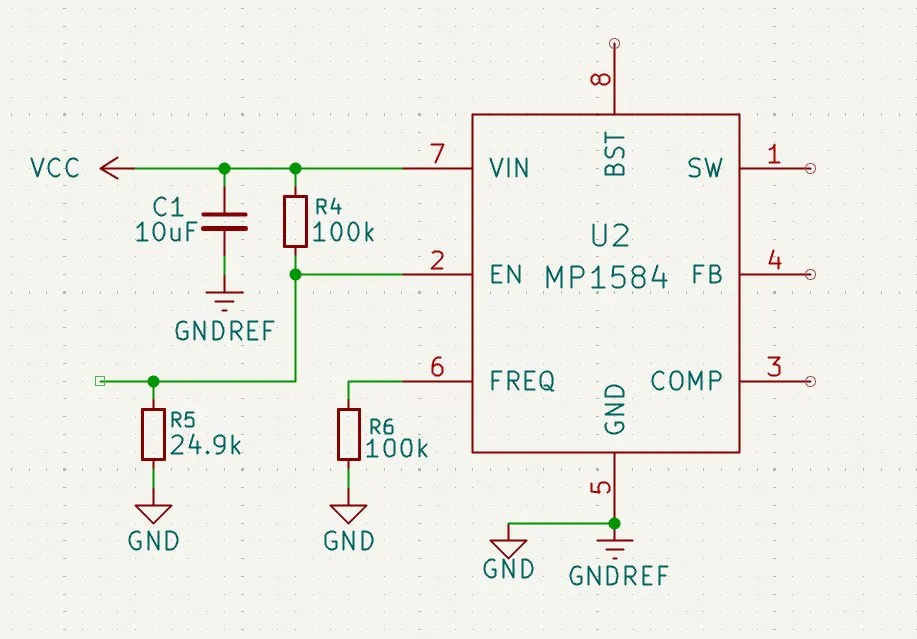
I then wanted to make the EN pin but didn't know how to connect it properly. But then I realized that I had already combined the EN with power from VCC because I had connected it with the VOn net. And after adding the voltage divider resistors R4 and R5, I would get exactly 2.2V, which is perfect for the EN pin.
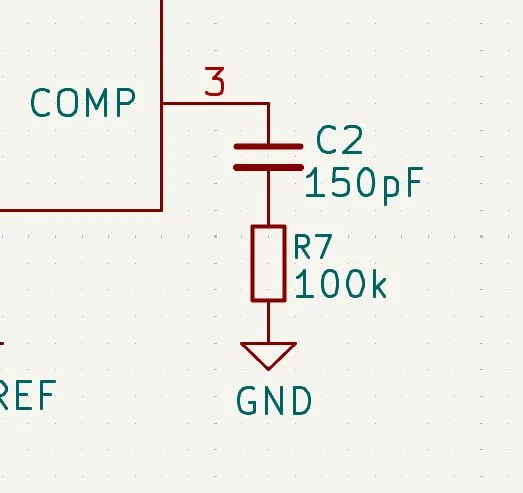
Then I continued on the COMP pin, which is necessary for the control of the correct voltage. There I have to use a resistor (R3) for defining how fast the chip is allowed to react to changes. The C3 acts like a shock absorber. Normally you also use the C6 capacitor, but the datasheet mentions it is only used if the output capacitor is an old electrolytic capacitor (Elko). Since I am using a modern Ceramic one, I don't need the C6!
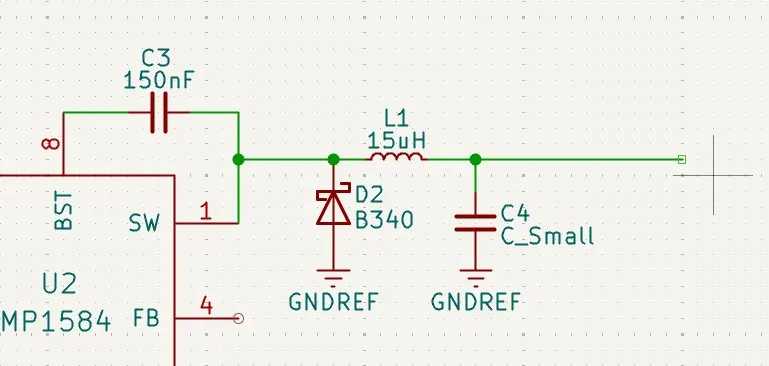
Next I continued on the BST, SW, and FB pins: They are there for actually dropping the voltage. The SW pin is like a crazy insane fast light switch that toggles the flow of current through a diode, which only lets electricity flow one way to the inductor. The FB gets the feedback so that it can adjust how fast the switch should be. But so that the chip can pump so fast, it actually needs a higher voltage than the battery. So the capacitor C4 gives the chip an extra boost so the internal switch can work (BST pin).
For the diode I used the B340 Schottky diode because the datasheet recommends it and it can handle up to 40V and 3A. And after also adding the inductor L1 with 15uH, it looked like this:
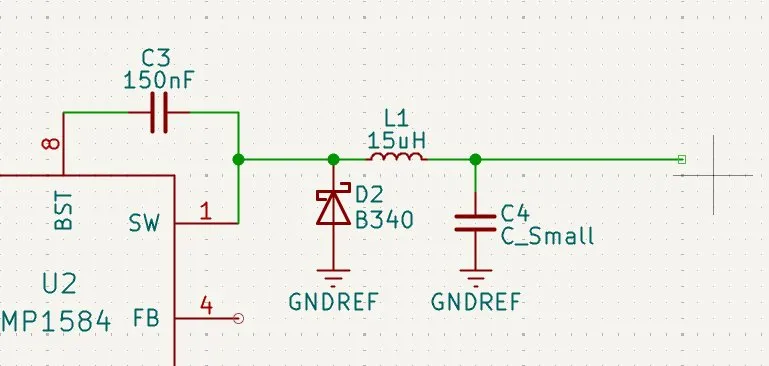
And after I finished, it looked like this:
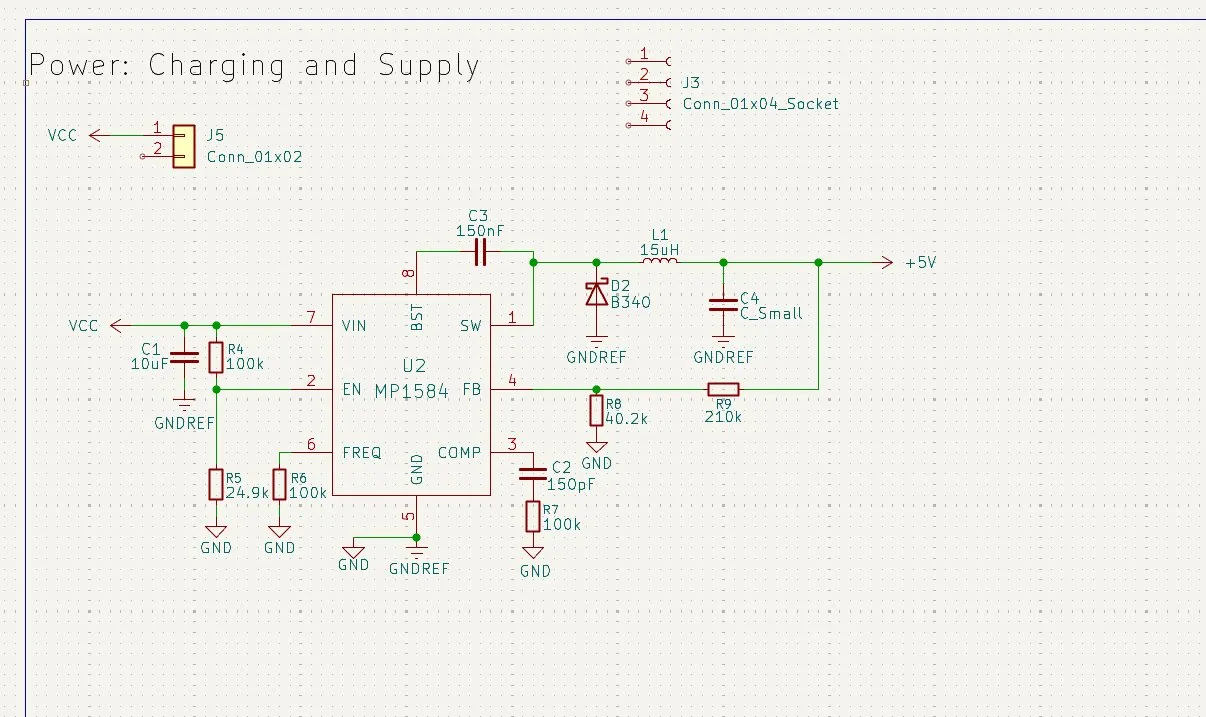
Lastly, I tidied it up a bit so that it is more compact and better to read:
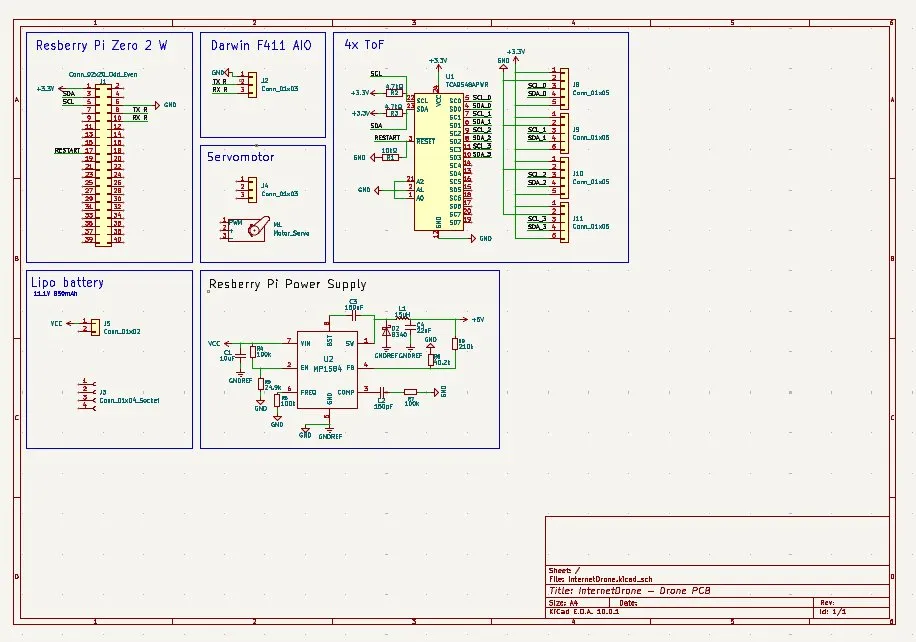
Happy with today's progress! Made the converter. Huge progress on the PCB. TMW will be the connection to the Raspberry Pi!
Session recordings
Timelapse recordings of this session.