Starting coding and making Takoff!!!
- Session
- 28 of 33
- Date
- 26 May 2026
- Time worked
- 2 h 27 min
- Reading time
- 7 min
- Images
- 1
And now it's CODING TIME !!!
Firstly, I cloned my GitHub project and then directly created a folder called firmware, where all the code will go. Then I split it into 2 folders: 1. drone and the other one server. In the drone folder will be the code for the drone, and in the server folder will be the code for connecting the drone with the server, the website, the control, and the server. I directly created a README in the firmware folder to clarify this, and after writing the README, I started with the drone:
First, I just copied the code from the YouTube video tutorial to have a base to start and understand MAVLink better. I got the code from this: https://www.youtube.com/watch?v=riWIg6Yx4KI
And after creating a venv and installing pymavlink, it was without errors.
But understanding how this works and optimizing it for mine was TOUGH and extremely hard. But then I found that guide which made it a bit easier: https://ardupilot.org/dev/docs/raspberry-pi-via-mavlink.html
And I didn't get anything reading the GitHub code for that tool. Searching online for other guides, nothing helped or worked, and after watching the video again I understood how it worked (but not completely).
- make ssh connection with the drone
- install mav proxy
- setup fc wiht mission planner, to enable the UR ports
- set the boud rate to 115200 +set the protocol to mavlink 2
- make the connection between the pi and fc:
- ssh connection to the pi 2 cd .local/bin
- python3 mavproxy.py -- master=/dev/serial0 -- baudrate 115200 -- aircraft MyCopter <-- install maxproxy
The only problem now is that at the end of the video, he showed the code once, and in the doc file, the codes were different. I thought the code in the docs was up to date, but the code in the video looked like the right one.
But then I got the code: So before all of that, you first have to run all the commands at the top.
And then you basically connect with master = mavutil.mavlink_connection('/dev/serial0', baud=115200) with 115,200 bits per second communication (have to later check if my FC can handle it) and this port: '/dev/serial0'.
Then you activate the motors with
master.arducopter_arm()
and then run the command:
master.mav.command_long_send( 1, 0, mavutil.mavlink.MAV_CMD_DO_MOTOR_TEST, 0, 1, 0, 20, 2, 0, 0, 0 )
And here is where it gets a bit confusing, because there are like 10 different numbers.
But we will break it up a little bit with nice comments:
master.mav.command_long_send( 1, # system id of the fc 0, # autopilot mode of the fc mavutil.mavlink.MAV_CMD_DO_MOTOR_TEST, 0, # confirmation 1, # motor number 1 0, # throttle value in percentage 20, # throttle value in percentage 2, # time in seconds of the test 0, # - 0, # - 0 # - )
And now, after understanding the code, I wanted it to be able to control all motors independently. Because I want to firstly make a web app where you can control the drone manually, so you see the sensor data, you can control the servo, see the camera feed, and can control the motors, and also the AprilTag tracking, but it doesn't fly autonomously, because that requires a lot of trial and error and would be too much pain. So I want you to be able to control each motor independently, the throttle and the time of it, but I forgot to record all of that !!!!! 1 and a half hours of work for nothing T-T (ok, not for nothing, but nevermind).
But for that, I will organize the drone folder a bit better. I'll make one file called motor for the motors, one camera for the cam, and one called servo for the servo, and one for the ToF sensors called tof_sensors, and the last one main, where everything is put together and sent to the server.
In the main I left the connection builder and the imports, but during the search I found that you can also, for the optimal flight, wait until you get the first heartbeat with the command wait_heartbeat(). So I created a function in motor.py called motor where you can say which motor, how much throttle, and for how long. Additionally, I want to add a function that is for the takeoff because it should be very easy, because it is also just one command called. But I found out that you actually need GPS for the takeoff and I don't have GPS, but I have the ToF sensors and I can use them instead in a custom function, so I will do these first.
Firstly I checked which I2C I had, and after looking at the schematics I saw that it was the
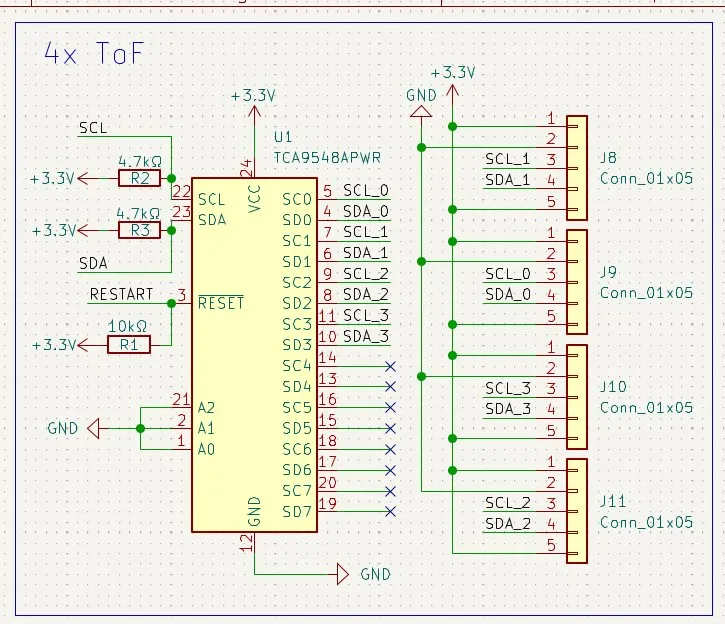
TCA9548A.
In the code I firstly initialized the I2C and the TCA. I made it by firstly importing the busio and adafruit_tca9548a library, and then with these two commands:
""" initialize the i2c bus """ i2c = busio.I2C(board.SCL, board.SDA)
"""initialize the tca9548a multiplexer and set the adress to 0x70""" tca = adafruit_tca9548a.TCA9548A(i2c, address=0x70)
Then I added the channels that I used and go through them, measuring the distance of all of them after each other with a for loop. To do this, I firstly created a list where all the addresses are, and in a while loop, measured the distances from all sensors one after the other and then returned the distances as a list every 4 measurements, so that every session and this happens every 100ms. So measurements happen about 10 times per second.
The only problem now would be that if I start the function, it would just run all the time but stop the rest of the code. And to avoid that, I need to somehow make it so that it can run in the background of the code but give new data 10 times a second. And to find out how to do this, I firstly searched up how to do this exactly. And while doing that, I saw that I should do a class because the setup and initializing was currently also in the same function. So I kinda changed the system a bit:
I created a setup function where all the initializing happens and moved the list tof_sensors into the init function, but I still had to make it work in the background. After a quick search on the internet, I found a nice library called threading that lets you, like I need it, run stuff in the background, and therefore I had to create also a start function to start the threading.
But after I had implemented the start function with:
def start(self):
        # start the thread for the distance measurement loop
        thread = threading.Thread(target=self.measure_distances)
        thread.start()
I still had one problem: I still had to take the measure_distance function, which wouldn't work because it would have to be perfectly aligned in time to work out. So I had to make it so that it doesn't return the distance. It has to save the distance in a list, and then I have to make another function to get the distance which just returns the list. And after doing that, I was finished with the sensors. Then I remembered that I should make a requirements.txt file, and after creating it I thought, "Nah, I'll do this when I'm finished with coding." And then I remembered that I should do also a stop function for the sensors and measuring, so stopping the task from the threading. For that, I had to make a new self variable named running to make it possible to make it stop running. And nOw the sensors are really finished. And I right away started with the take off....
Therefore, firstly I had to deactivate GPS, because it doesn't use GPS, with master.set_mode('GUIDED_NOGPS').
And next I implemented a small 1 sec wait to ensure the mode is changed. Then I armed the drone -> activated the motor.
After that, the target altitude is changed from meters to millimeters, and the climbing speed is turned from positive to negative because positive speed in MAVLink is positive down, and the drone would push itself into the bottom.
And after that the ✨✨REAL TAKE-OFF✨✨ (I extra searched the sparkling emojis up...) comes, it's basically a while True loop with that MAVLink command:
master.mav.set_position_target_local_ned_send(
            0, # time_boot_ms
            master.target_system, master.target_component,
            mavutil.mavlink.MAV_FRAME_LOCAL_NED,
            0b0000110111000111, # type_mask (only vertical velocity is enabled)
            0, 0, 0, # x, y, z positions (not used)
            0, 0, climb_speed, # x, y, z velocity in m/s
            0, 0, 0, # x, y, z acceleration (not used)
            0, 0 # yaw, yaw_rate (not used)
        )
And the drone goes up until it reaches a position or higher of 95 percent of the target altitude, and it checks 10 times a second. And if it reaches the height, it goes over to ALT_HOLD, which means hold the altitude and just stay still. And after one second of waiting, the takeoff is finished.
Happy with today progress, but coding journals take SOOOOOO much longer, but nvm. Tomorrow I´ll add the camera feed and april tak the rest of the flight and servo motor!!!
Session recordings
Timelapse recordings of this session.