Finished the Schematics of the PCB: charging mode etc!
- Session
- 17 of 33
- Date
- 12 May 2026
- Time worked
- 2 h 27 min
- Reading time
- 6 min
- Images
- 11
I started by adding GND to the battery because I forgot it last time, and then I added a parallel connection for the Raspberry Pi and the servo motor. But I didn’t know how to connect the power to the Pi, so after searching I found 2 options:
- over Micro-USB
- connect the power supply + to the 5V pin (pin 2 or 4) and GND to any GND pin on the Raspberry Pi, but pin 6 is the recommended one
I decided to use the pins because I am building the PCB directly for the Pi pins and mounting it there. So after fixing the GND and power for the Raspberry Pi it looked like that:
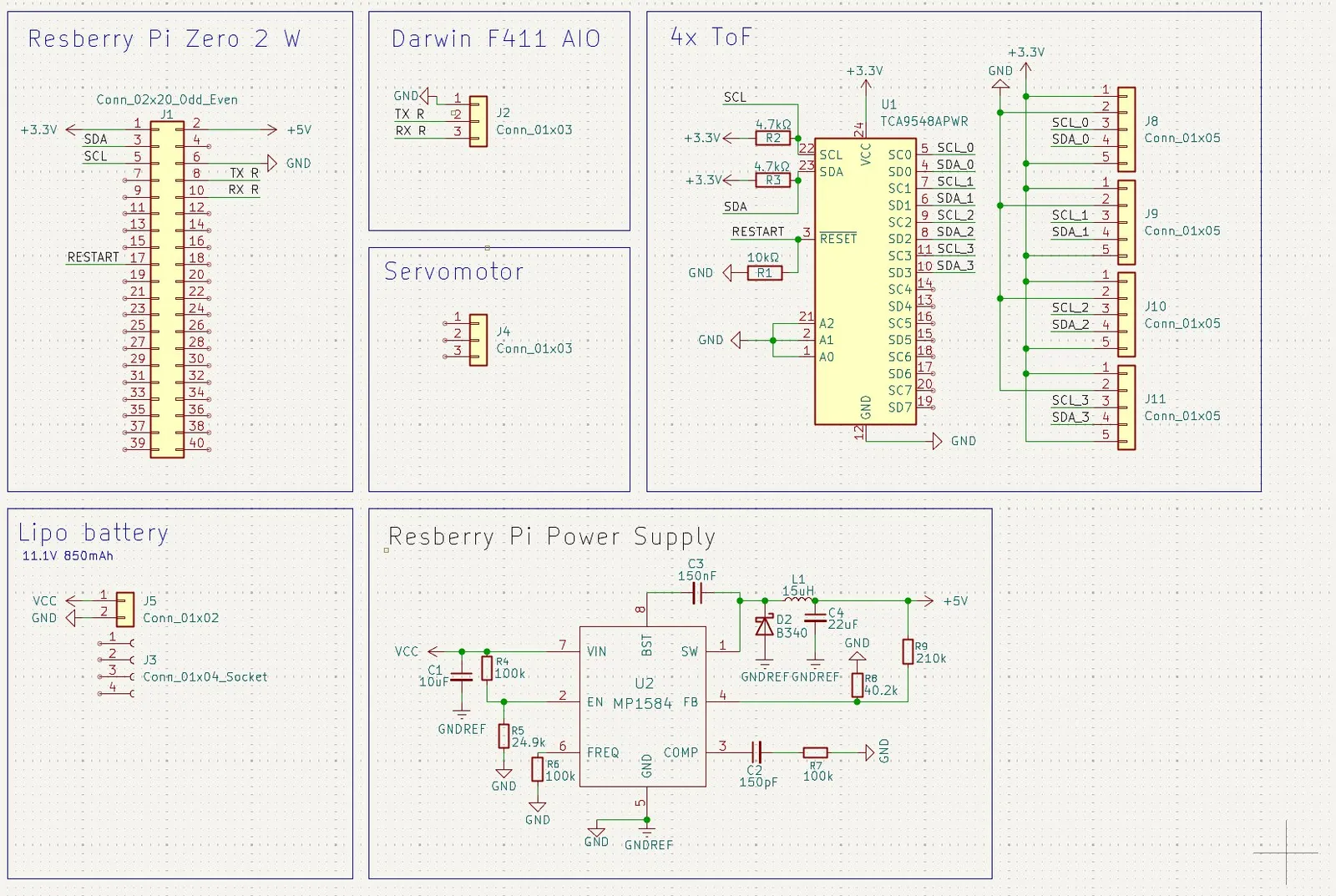
And then I wanted to add the power for the servo and the connection to the Raspberry Pi, so I first created the GPIO pin connection to the Raspberry Pi.
After googling I found out that you should use GPIO18 because it supports PWM, which is needed for controlling servo motors smoothly. That’s why I quickly made the connection.
But then after starting the 5V connection I remembered that the chip can maximally produce 3A, AND THE RASPBERRY PI already needs around 2A under high load, and sometimes the servo can also need up to 1A during startup spikes. So it would be VERY close and I was afraid that my chip could melt, so I decided to add a capacitor for extra current buffering so that voltage drops and current spikes don’t melt the system.
After searching online I found out that radial electrolytic capacitors are the best for this because they can store a lot of energy in a very small space, which is PERFECT for my drone.
Then I also found out that the capacitor voltage rating should be at least double the system voltage for safety and reliability, so around 10–15V.
After adding the values into a calculator with an example of 1000µF it calculated:
(and sorry, during that time till 20:22 I had my English project open — didn’t work on it during recording though, just forgot to close it. Sorry!!)
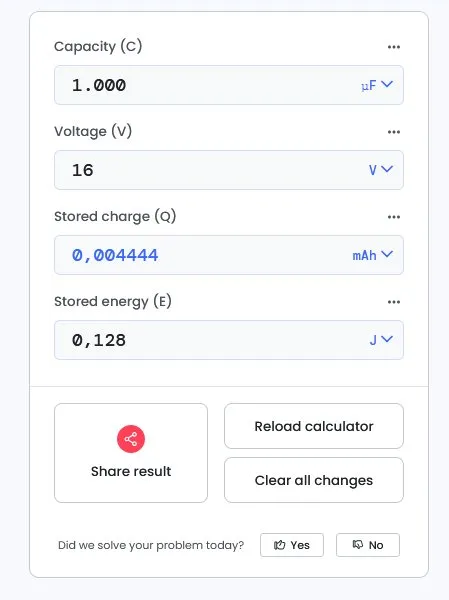
And then I got 0.1125 Joules, and after calculating how much current it could provide and dividing it by 1–5ms (because servos create very short but high startup current spikes during the first milliseconds before the motor fully spins), I got values from max 16A down to around 3.2A depending on the discharge time, WHICH IS PERFECT for me because now the servo will probably not melt my chip.
And after everything was clear I added that to the circuit.
After adding that it looked like that:
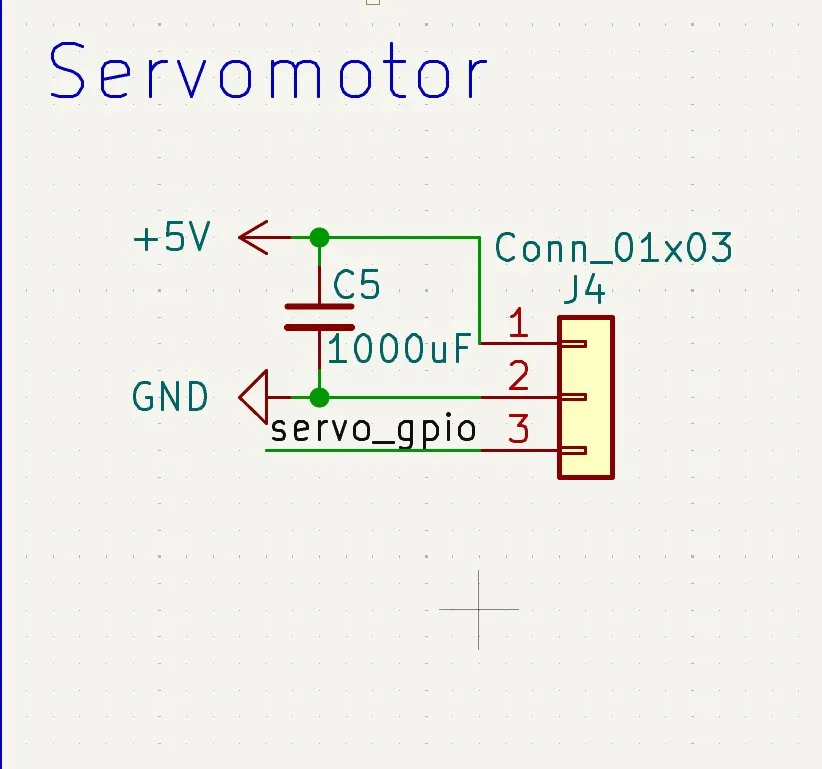
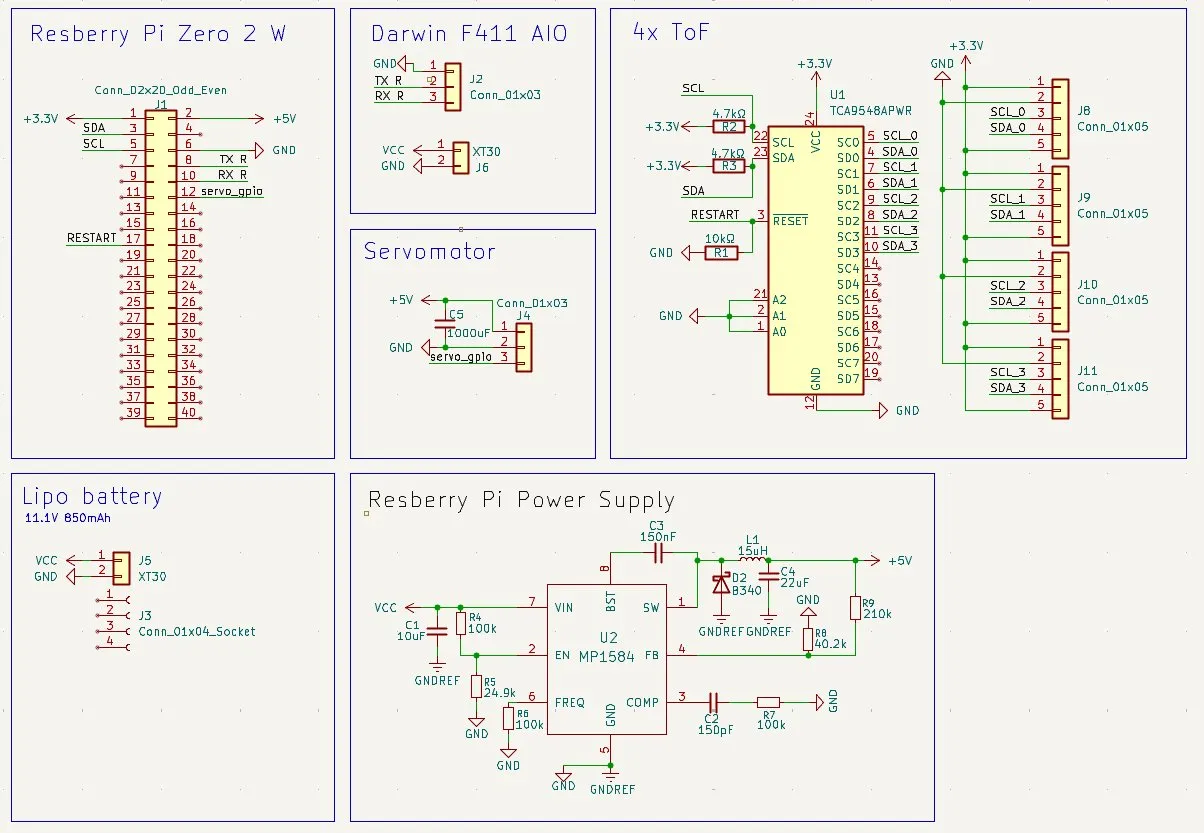
Now only the power connection to the FC was missing. So I decided to power the FC directly from the battery (throu the PCB) because it has an inbuilt buck converter. That’s why I searched for an XT30 connector to connect the power cable.
And after building that it looked like that!! Awesome:
Lastly for this session I wanted to finish the schematics, so I wanted to add the pogo pins so the batteries can also be charged.
Therefore I first thought of a principle so everything works properly:
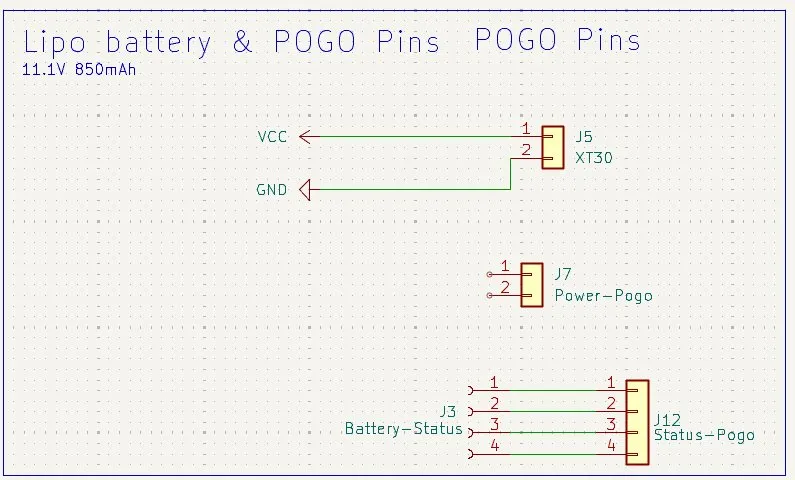
I will have 2 different pogo pin types:
- 2 thick ones for the main power
- 4 smaller ones for battery information (Cell 1, Cell 2, Cell 3, and GND)
Then I should have a diode directly after the power pogo pin so that if I accidentally touch it my finger doesn’t get cooked etc.
Then I also wanted to use something that closes the circuit during charging so that the Raspberry Pi, servo, and FC aren’t powered while charging, because otherwise battery measurements and charging could become unstable.
So I started by first adding the pogo pins and then directly connecting the 4 status pins:
Then I wanted to add the circuit breaker system, and I found out that I would need a High-Side Switch circuit with a P-Channel MOSFET because:
It works by allowing power through when no charging voltage is on it. Sooo, the Raspberry Pi, servo, and FC get power. But once the pogo pins connect and charging starts, the MOSFET gate changes state and disconnects the system power from the battery.
After that I only had to find which exact model I should use.
Very important requirements for me were:
- 20–30A current handling
- around 30V
- 10–20mΩ
About 20–30A because:
- the FC can take max ~15A
- Raspberry Pi + servo can together take ~4A
- and I wanted extra safety margin
About 30V because:
- you should generally use about double the operating voltage
- 11.1V ×2 + safety buffer
And the resistance should be as low as possible so I don’t lose too much voltage and generate unnecessary heat.
With these criteria I found 2 chips:
- AO4407A
- AOD4185
The problem with the AO4407A was that it only supported around -12A, so it was too weak. That left the AOD4185, which actually had slightly overkill specs:

But I decided to use the AOD4185 because I probably won’t run into any problems with it.
Then I added it into KiCad.
Then I wanted to wire everything up, but after seeing the datasheet I first didn’t understand anything:
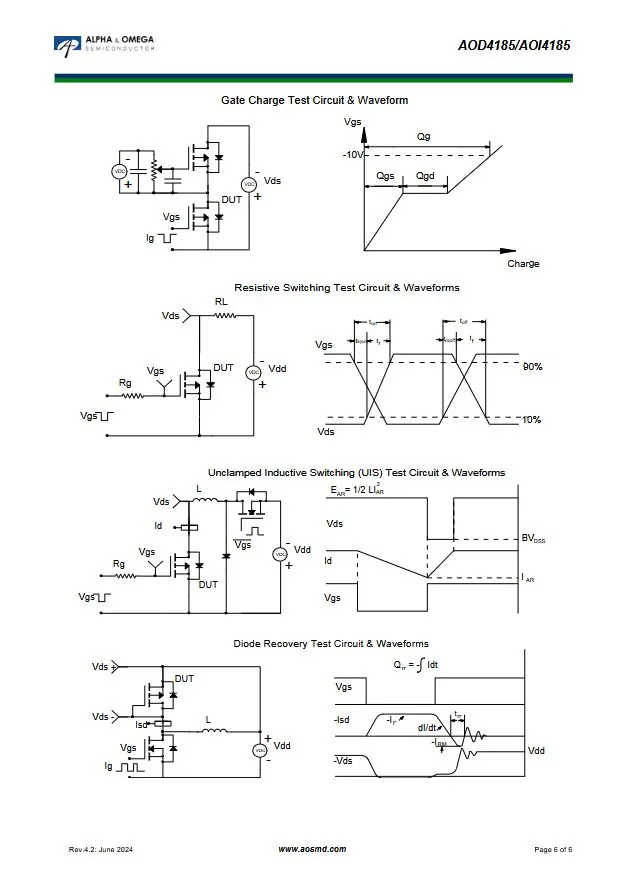
But after a bit of time I finally understood how it worked.
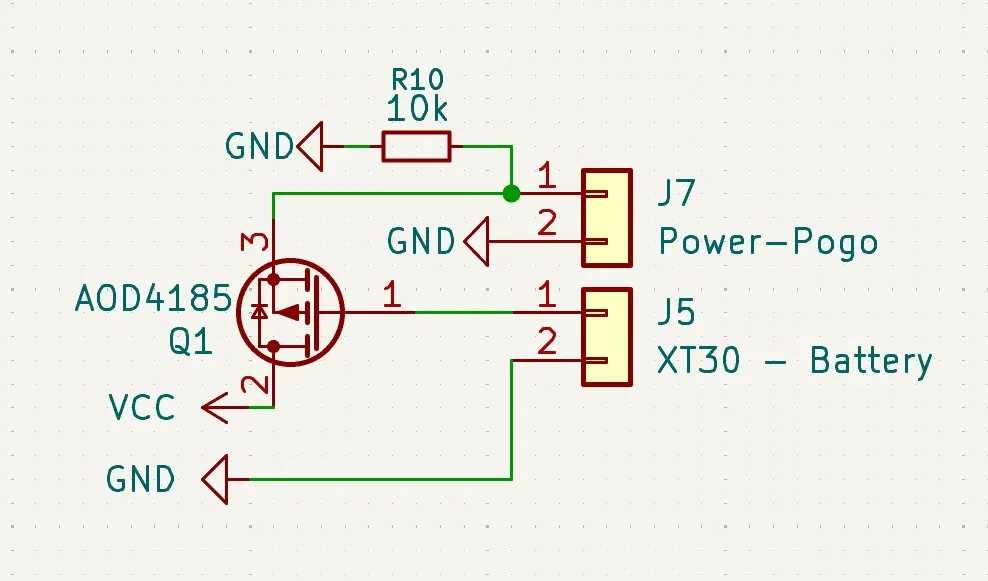
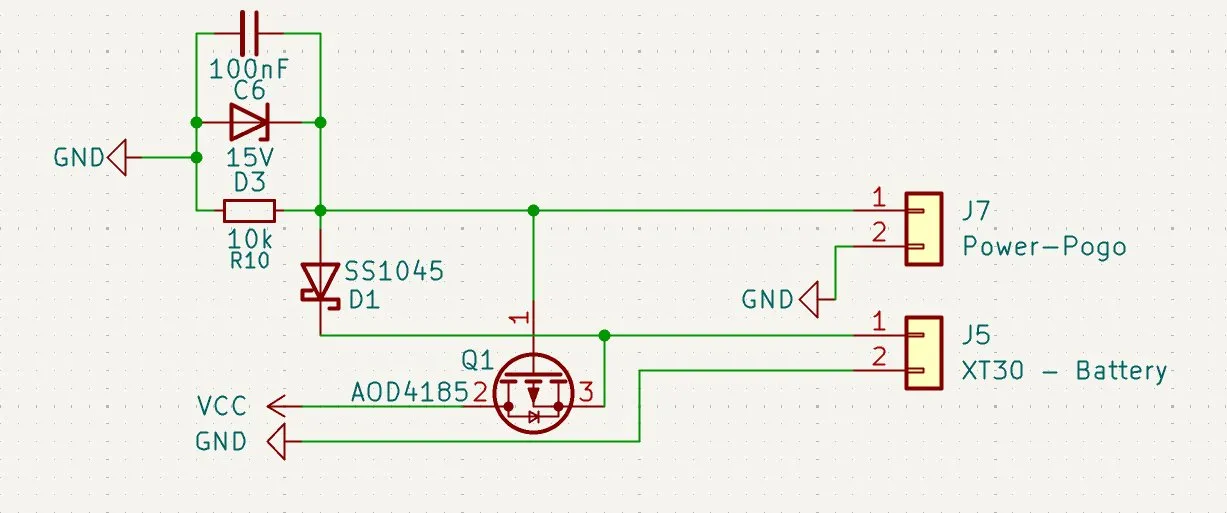
I first had to delete the connection between VCC and J5 Pin 1, and then route the power through the MOSFET drain to VCC.
After that the plus from the pogo pins gets connected to pin 3 of the AOD4185.
There I also had to use a pull-down resistor so that when the drone is NOT connected to the pogo pins, the gate is connected to GND and the module stays activated, allowing power through normally.
Then after managing the power lock for the charging system so that charging works good:
I continued on the diode protection for the power pogo pins so that I don’t get shocked or burn my PCB.
I decided to use a Schottky diode because they have very low forward voltage drop and are fast, which makes them good for power protection.
After a bit of searching I decided to use the SK1045 because it can handle 10A, which is pretty good for the landing process.
But then I thought: What if something metallic or finger ect. touches the pogo pins during mid-flight while the motors are active and spikes of 30–40A appear?
SO I HAD THE IDEA TO USE A 100nF CAPACITOR as a filter for extremely short touches, and additionally use a 15V Zener diode that clamps voltage spikes and ESD events.
Because indoor environments can create a lot of static electricity (like carpets etc.), this should protect the MOSFET gate and the system. So I started implementing my LOOOOOOONG thought into KiCad.
But during that I noticed that I forgot to connect the power correctly.
And while fixing it I realized that I mixed up the MOSFET pins: pin 3 was actually the input and I accidentally placed the diode like 10 times on the wrong side etc.
After that I also added the 15V Zener diode and the 100nF capacitor:
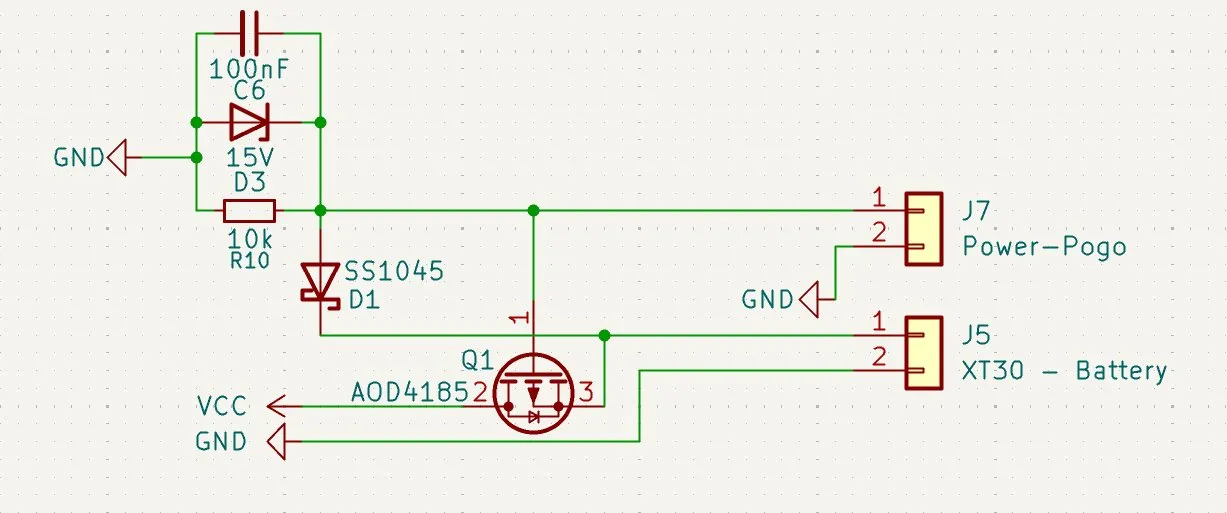
And after that process it looked like that:
And after a bit of tidying it looked like that:
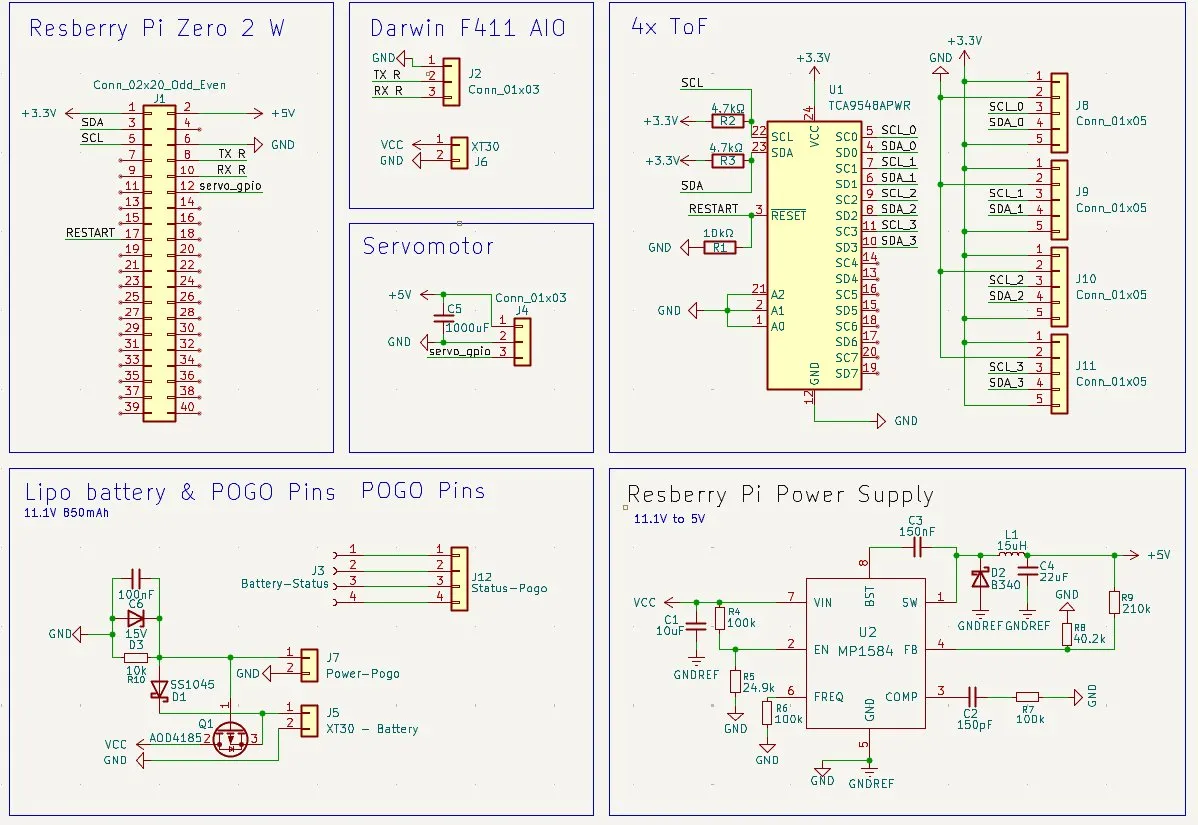
AND..... that was it for the session. It’s 11PM now and I gotta sleep.
BUT I’m VERY happy with the progress today. I’ll send it into Slack for checking again, and tomorrow will be routing/tracing and finishing the PCB for the drone!!!11
Session recordings
Timelapse recordings of this session.