Finishing the Firmware!
- Session
- 31 of 33
- Date
- 28 May 2026
- Time worked
- 1 h 10 min
- Reading time
- 3 min
- Images
- 2
I decided to not use UDP because I don’t need such a fast connection and it’s too risky to lose packages, so I decided to use requests and a REST API for the following things:
I started with the telemetry API where the drone sends the data that is then just displayed, like the battery percentage and the 4 distances from the ToF sensors, which are divided by 10 so that they get converted from mm to cm.
Then I added the command requests for starting the flight, stopping the drone, testing the motors, and moving the servo.
## -- API commands ---

@app.post("/api/drone/start")
def start_drone():
    try:
        response = requests.post(f"{pi_url}/drone/start", timeout=1)
        return response.json()
    except Exception as e:
        print(f"Error occurred while starting the drone: {e}")
        return {"status": "error", "message": "Failed to start the drone and to reach the raspberry pi"}

@app.post("/api/drone/stop")
def stop_drone():
    try:
        response = requests.post(f"{pi_url}/drone/stop", timeout=1)
        return response.json()
    except Exception as e:
        print(f"Error occurred while stopping the drone: {e}")
        return {"status": "error", "message": "Failed to stop the drone and to reach the raspberry pi"}

@app.post("/api/flight/start")
def start_flight():
    try:
        response = requests.post(f"{pi_url}/flight/start", timeout=1)
        return response.json()
    except Exception as e:
        print(f"Error occurred while starting the flight: {e}")
        return {"status": "error", "message": "Failed to start the flight and to reach the raspberry pi"}

@app.post("/api/servo/move")
def move_servo(command: ServoCommand):
    try:
        response = requests.post(f"{pi_url}/servo/move", json={"angle": command.angle}, timeout=1)
        return {"status": "success", "message": f"Servo moved to {command.angle} degrees"}
    except Exception as e:
        print(f"Error occurred while moving the servo: {e}")
        return {"status": "error", "message": "Failed to move the servo and to reach the raspberry pi"}

@app.post("/api/motor/test")
def test_motor(command: MotorTestCommand):
    try:
        response = requests.post(f"{pi_url}/motor/test", json=command.dict(), timeout=1)
        return {"status": "success", "message": f"Motor {command.motor_number} tested with throttle {command.throttle} for {command.duration} seconds"}
    except Exception as e:
        print(f"Error occurred while testing the motor: {e}")
        return {"status": "error", "message": "Failed to test the motor and to reach the raspberry pi"}
And then I started implementing the API endpoints in the main file of the drone. Therefore, I firstly started a FastAPI server to send and access the API, and then I simply created POST and GET endpoints and returned the output of the corresponding functions that were already in the main.py file of the drone.
I thought that the whole flight should run in a background task because it could take up to 1 minute and would completely stop the API POST and GET flow with the cockpit. So after searching online, I found out that FastAPI has a tool called BackgroundTasks, which lets users run tasks in the background, and that is exactly what I used:
@app.post("/api/flight/start")
def api_start_flight():
    try:
        # add a bg task to ensure the api loop keeps running while the flight loop is executed in the background
        fastapi.background_tasks.add_task(flight_loop)
        return {"status": "Flight started successfully"}
    except Exception as e:
        print(f"Error occurred while starting the flight: {e}")
        return {"status": "Failed to start flight"}
And now I only had to connect the server with the HTML website.
Therefore, I firstly looked online how to do that, and it’s actually pretty simple. You just have to write in the JS file which object, text, button, slider, etc. you want to use and what data it should show based on the API or which data it should send.
So I started with the connected symbol at the top to check if the drone is connected with the server.
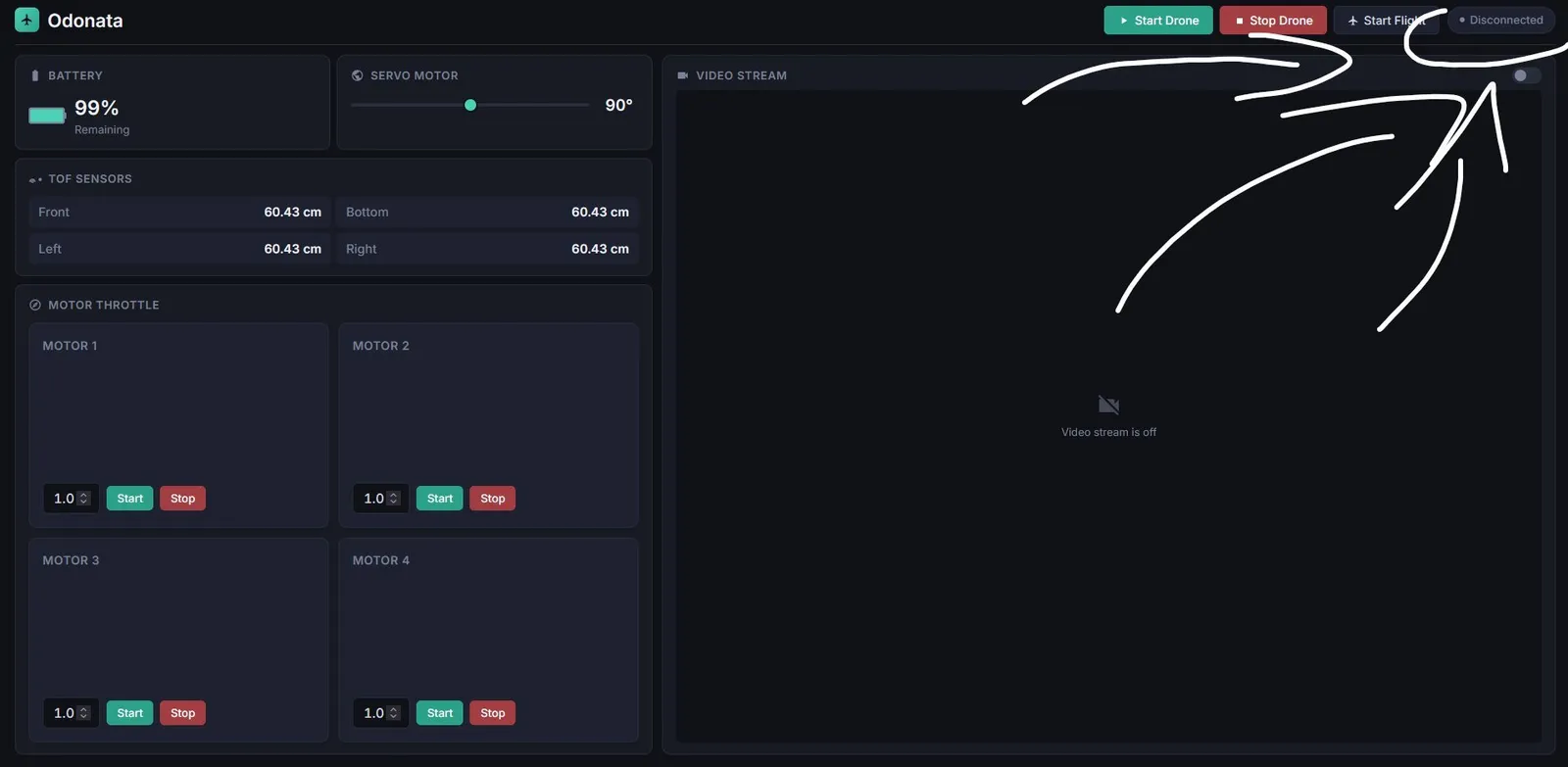
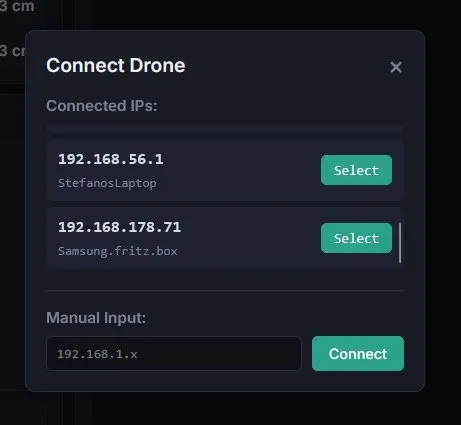
And after adding all the other stuff that I listed previously, I was finished with the coding part. But then I had the idea that you could input the IP of the drone in the cockpit so that it would be easier to access and more user friendly. So I quickly added a new button and again connected it with the backend to change the pi_ip variable.
I also then decided to automatically check which IPs are connected with the network, and then it looked like that after letting Claude improve the style a bit.
Happy that I’m finished with coding and basically with the project. I now only have to make the zine, upload everything to GitHub, and write the README.
Session recordings
Timelapse recordings of this session.