Coding the Apriltag tracking, servo and the battery status
- Session
- 29 of 33
- Date
- 27 May 2026
- Time worked
- 2 h 58 min
- Reading time
- 6 min
- Images
- 2
Today I firstly wanted to make the camera and the april tag because for the next step in the flight I would need them, because for the movement I need to orient on the april tag.
- I created a new file named camera.py, and then I saw in the AliExpress store that they explained how to use it and how to set it up, etc.
And because I also wanted to measure the distance from the april tag directly, I wanted to make both in parallel, and I found this awesome guide for the apriltags, from which I want to use some parts: https://pyimagesearch.com/2020/11/02/apriltag-with-python/
But then I got some issues with my venv, and actually the problem was that I forgot to add a # into my comment in the requirements.txt file.
After installing all the libraries again, I also made:
pip freeze > requirements.txt
the requirements.txt:
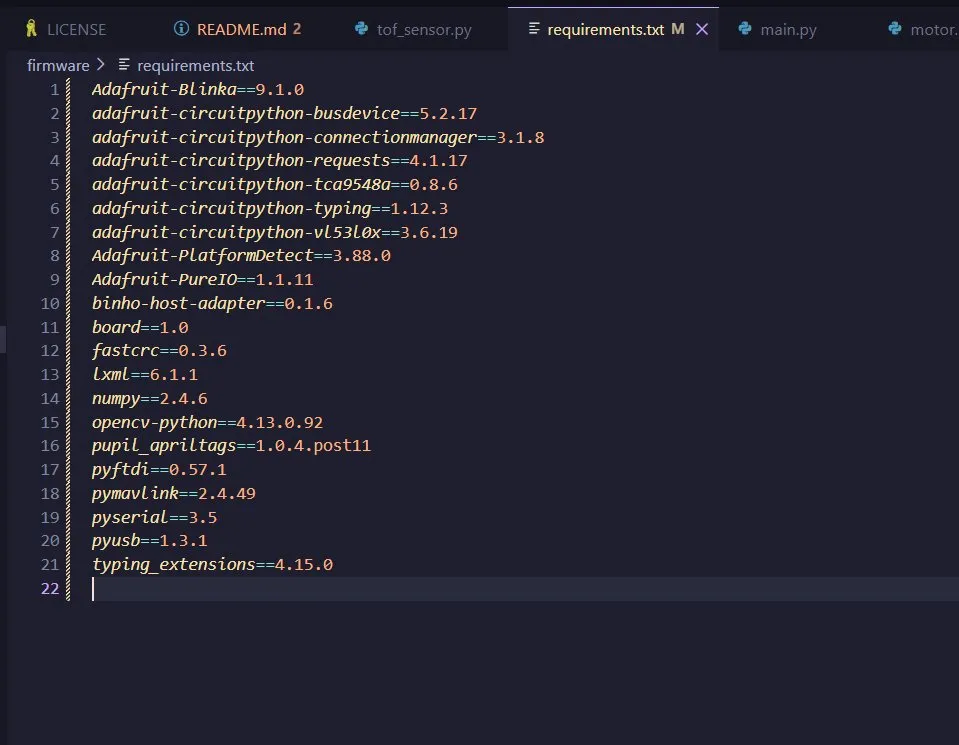
and after making a commit it was perfect.
And I decided to first make only the april tag detection with my camera, and when it works, I’ll implement the resberry pi cam. For that I need to print out the april tag, but first I have to check how big it is allowed to be.
And after I found code in Python, it worked perfectly, and the april tag was completely found.
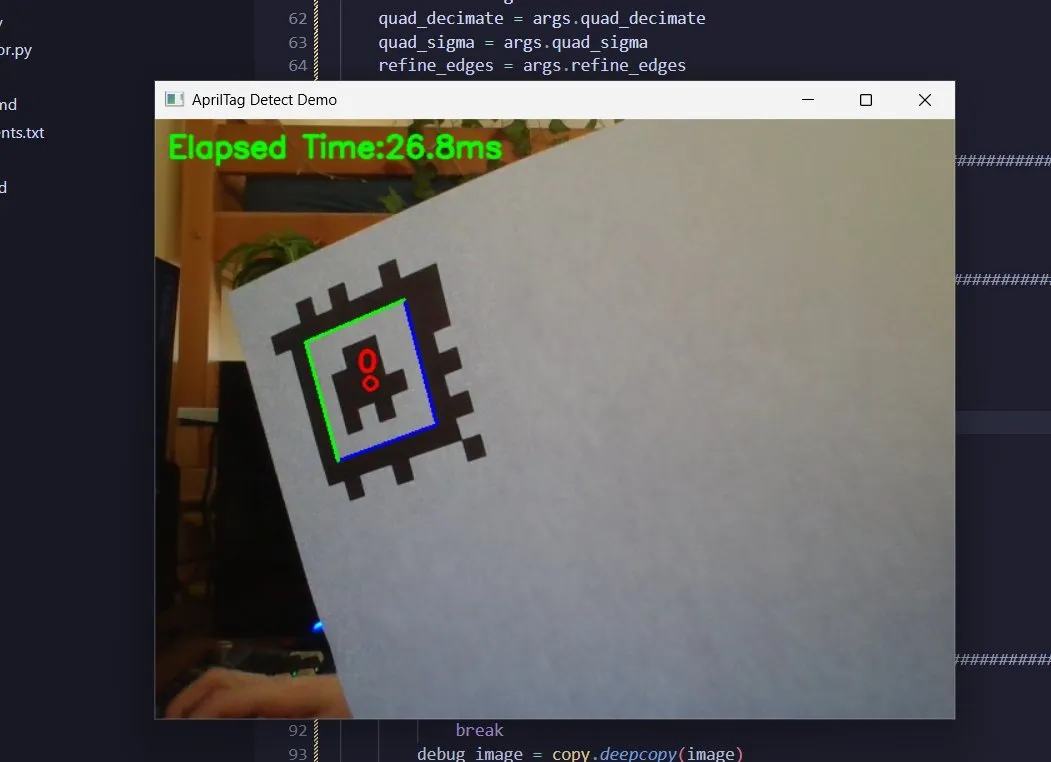
But I didn’t want to steal the code from the person, so I deleted most of it and started coding it myself.
So after reading a lot of other code, the documentation, and guides, I found out that you need argparse, and with the ArgumentParser and add_argument(), you can set arguments for the detection, like the width and height of the image, the family of the tag, so which tag should be searched, the nthreads, so how many threads should be used for the detection, and the quad_decimate. This is the factor by which the image is scaled, so it can get better results with higher values, but it takes longer.
I first coded it like this, but I got errors and it didn’t work:
import argparse
import cv2 as cv
from pupil_apriltags import Detector

## defining the arguments of the parser
ap = argparse.ArgumentParser()
ap.add_argument(
    "--width", type=int, default=640, help="the width of the video stream",
    "--height", type=int, default=480, help="the height of the video stream",
    "--family", type=str, default="tagCostum48h12", help="the family of the april tag to detect",
    "--nthreads", type=int, default=3, help="the number of threads to use for the detection (cpu cores)", # the resberry pi zero 2 W has 4 cores -> use 3 for the detection
    "--quad_decimate", type=float, default=1.5, help="decimate input image by this factor (lower means faster but less accurate detection)"
)

## pars the arguments
args = ap.parse_args()
And I decided to use these values because, after research, these were the best values for a micro computer like the resberry pi zero/w/2w.
But you have to actually make ap.add for every argument itself.
And after fixing that, the text was this:
import argparse
import cv2 as cv
from pupil_apriltags import Detector

## defining the arguments of the parser
ap = argparse.ArgumentParser()
ap.add_argument("--width", type=int, default=640, help="the width of the video stream")
ap.add_argument("--height", type=int, default=480, help="the height of the video stream")
ap.add_argument("--families", type=str, default="tagCostum48h12", help="the family of the april tag to detect")
ap.add_argument("--nthreads", type=int, default=3, help="the number of threads to use for the detection (cpu cores)") # resberry pi zero 2 W has 4 cores, so using 3 of them for detection
ap.add_argument("--quad_decimate", type=float, default=1.5, help="decimate input image by this factor")

## pars the arguments
args = ap.parse_args()
Then I set up the camera, and this part was easy because I used cv2 often in previous projects. I set the camera firstly to 1 (the second cam, because I have multiple cameras), and then set the camera height with the argparser argument parser.
## setup the camera
cap = cv.VideoCapture(1)
cap.set(cv.CAP_PROP_FRAME_WIDTH, args.width)
cap.set(cv.CAP_PROP_FRAME_HEIGHT, args.height)
Then I set up the detector with the corresponding arg families, nthreads, and quad_decimate.
## setup the april tag detector
at_detector = Detector(
    families=args.families,
    nthreads=args.nthreads,
    quad_decimate=args.quad_decimate
)
And then I continued with the real detection with a while loop. It first reads the frame, converts the image into gray for optimal detection, and then detects the tags and prints their position.
    while True:
        # read a frame from the camera
        ret, frame = cap.read()

        if not ret:
            print("Failed to grab frame")
            break

        image = cv.cvtColor(frame, cv.COLOR_BGR2GRAY)
        tags = at_detector.detect(image)

        # print the detected tags and their positions
        for tag in tags:
            print(f"Detected tag with id {tag.tag_id} at position {tag.center}")
But during testing it was really hard to see through the camera, so I decided to add an option that a window pops up to see the stream.
But then I understood why I got those weird coordinates, and when I was holding the apriltag in the middle of the camera it displayed something like 200 and 300 for x/y, but that didn’t make sense. So then I understood that 0, 0 was in the left bottom corner. And currently I only had the x and y coordinates, but I also need the angle, so that the drone knows in which direction it has to yaw, and also for fun the distance.
Then I wanted to make the yaw angle, so that the drone knows how to rotate so it lands correctly, and therefore you can convert the rotation from matrix to euler.
And now, where the system works, I deleted all the stuff that I didn’t need, like the roll and pitch, but I didn’t need the estimated x and y meters.
And after that I had to make, like in the tof sensor, a class with threading, because it has to run in the background. So I created the class camera, moved most settings into the init function, made a start and stop function, made a get data function, and a running variable to start and stop the process. And now I’ll make it so I can use the resberry pi camera, and actually I only had to change the cam from 1 to 0 for the default, and the cam was finished!!!
Next I continued on the servo motor, which should be much easier.
I firstly used the normal servo from the library gpiozero, but I quickly realized, after reading the documentation, that you could only give it the normal servo max, middle or min. But with AngularServo you could give an angle, which is much better and is what I will do. Then I made the code into 2 functions. The first one calibrates the servo, which moves the servo in the setup at the beginning before takeoff to angle 0 and waits one second. Then, at the move_servo function, the servo is moved when the angle that is given is in the safe area, and if not, the max or min value is used.
from gpiozero import AngularServo
import time

## the gpio pin for the servo
gpio_pin = 18

## safe angle range for the servo
min_angle = -90
max_angle = 90

## define the servo
servo = AngularServo(gpio_pin, min_angle=min_angle, max_angle=max_angle)

def calibrate_servo():
    # calibrate the servo
    servo.angle = 0
    time.sleep(1)

def move_servo(angle):
    # confirm and potentially adjust the angle to be within the safe zone
    safe_angle = max(min_angle, min(max_angle, angle)) # ensure the angle is within the safe range

    # move the servo to desired angle
    servo.angle = safe_angle
And next I’ll do the battery_percentage.
Therefore I firstly created a new file called battery_status.py, then I added the adafruit_ads1x1115 library and initialized the i2c with the SCL and SDA pins and defined my ads.
Then I defined that pin AIN2 is the input from Cell 3, which is the voltage of the whole battery, so that I can later estimate the percentage. But because in the schematics I added a resistor to bring the voltage from max 12.6V down to under 3.3V, because the i2c only can handle up to 3.3V, after redoing the math.
Happy today with the progress, almost finished the backend!
Session recordings
Timelapse recordings of this session.